
Darkroom, a Next.js template
AI image studio app
A chat-first image studio, in a warm dark theme with a light one a click away. Describe a place, a time of day and a feeling and a print develops on screen: a spiral of grains gathers into the picture, takes on its colours and sharpens into the finished image, then flies into a masonry gallery. Nine print styles (risograph, paper cut, halftone, Bauhaus, cyanotype, topographic contour, gradient mesh, pixel art and ink wash) are painted live on a canvas, and the same prompt and seed always give the same print. Projects and chats in a sidebar, a composer with reference palettes, aspect ratio, image count, model and mode menus, a styles panel that previews your own prompt, a zoomable viewer with pinch, pan and remix, Command K search, favourites and undoable deletes. Darkroom and every person, project and print are invented sample content; nothing calls an image model.
- AI Tools
- Advanced
- 1 page
- 8 sections
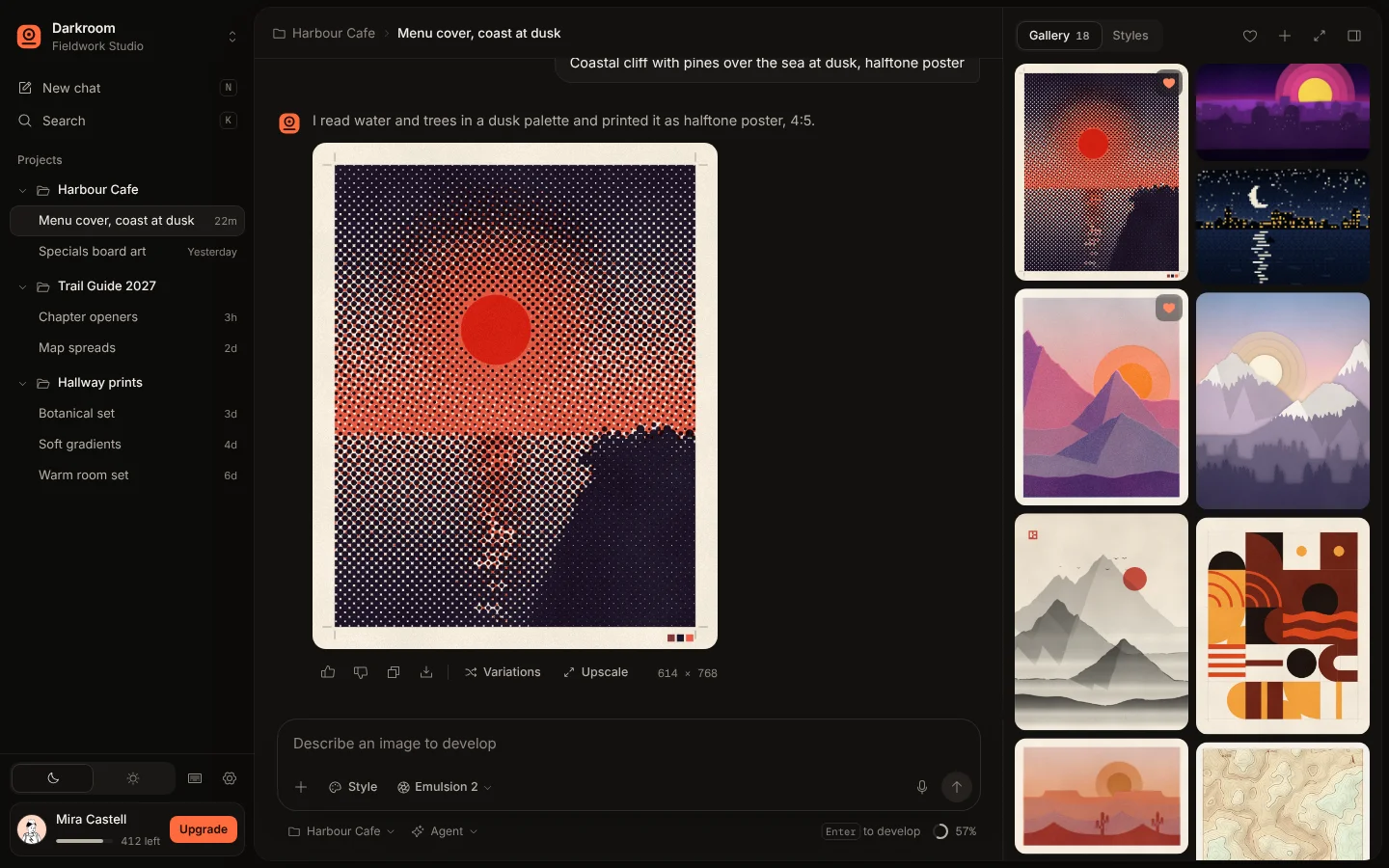
Inside the page
Screens from the live template. The first one is open to everyone; Pro unlocks the other 3.
What's in it
Sections, top to bottom
- 1Sidebar with Projects and Chats
- 2Chat with Developing Prints
- 3Composer
- 4Gallery
- 5Styles Panel
- 6Image Viewer
- 7Search
- 8Phone Gallery Sheet
Built in
- Prints develop on screen: grains spiral in, settle into a grid with the print's own tones, then a soft frame and the sharp image fade up
- Nine print styles painted on a canvas from the prompt and seed, so the same prompt always prints the same picture
- Finished prints fly from the chat into a spring-animated masonry gallery, or onto the gallery button when the panel is closed
- A composer with chips for reference palette, aspect ratio and image count, plus model, project and agent or direct mode menus
- A styles panel whose previews redraw with the prompt you are typing
- A viewer with wheel and pinch zoom around the pointer, drag to pan, arrow keys, Use prompt and Remix on a new seed
- Command K search across chats and prints, favourites, undoable deletes, light and dark themes and a draggable bottom sheet on phones
- Inter and Geist Mono self-hosted, Phosphor icons (MIT) and a Notionists avatar (CC0)
Run it on your machine
Get the code
Get Pro or lifetime access, then download the source zip from this page.
Install
In the project folder:
$ npm installStart it
Then open localhost:3000.
$ npm run dev
More templates
See all templates
Make Darkroom yours
Included in Pro, $49.99 a year, along with every other template. Swap in your words and colours and ship it.